

Yahoo Answers is a social networking platform that Yahoo sponsors. It allows users to ask other Yahoo users questions and receive answers based on specific categories. Yahoo Answers is ideal for those who wish to receive answers to personal questions and allows others to rate the best answer, specify their individual sources and qualifications concerning their response, and provide links with further information for the user asking the question. Yahoo Answers requires users to have a Yahoo account, but allows users to ask questions anonymously and hide their email address.
How to Ask a Question on Yahoo Answers
In order to ask a question on Yahoo, users can go to Yahoo Answers, type a question into the “What would you like to ask?” field, and click the “Continue” button. The user will then be asked to enter his/her account details, which will then allow the user to enter more information about the question and select whether or not to ask the question anonymously. If the user does not have a Yahoo account, he/she can create one by clicking the “Create New Account button.”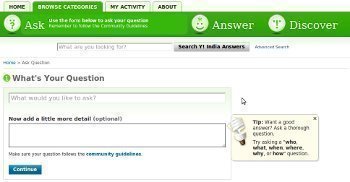
How to Receive Notifications on Yahoo Answers
While the user is asking a question, he/she will have the option to check a checkbox that gives permission for an email to be sent to the user’s Yahoo inbox every time someone answers the question. If a user does not check this email inbox often, he/she can also forward his/her Yahoo email to another email account. For example, if a Gmail user wishes to receive email from his/her Yahoo account, he/she can sign into Gmail, click the “Settings” link in the top right corner, and select the “Accounts” tab. The user can then select the “Add an email account you own” button under the “Get mail from other accounts” section and enter his/her email address. The user can then select “Next Step,” enter his/her password, and click OK. The user should now receive all Yahoo Answers notifications in his/her Gmail account.
Susan Jewett
I tried to get into “yahoo answers”but didn’t go through. My android crashed last eek, I thought I had to create a new e-mail account (username/password) which I did and create a new fb account. I took a new picture and fb disabled my Facebook and said I was trying to start a fraudulent account. I went to “recover your fb” and it said they would send me a reset code to “my old e-mail address (which I don’t have anymore). Can I somehow recover old e-mail account) ? Thanks?
Lisa
potterton performa combi boiler no hot water,or intermittent ,no heating?pressure is fine,any ideas please?