

What is SCP
SCP, or Secure Copy, is a protocol made for sharing files in a secure manner. SCP is similar to FTP, but is designed more for security and authentication than easy access. The SCP protocol runs on port 22 and uses both BSD RCP and SSH to protect the files that are being transferred. Some users speculate about the fact that SCP is just a combination of the two aforementioned protocols and does not constitute a protocol in and of itself. While SCP is widely used, it is now being replaced by the SFTP protocol which is basically just FTP routed through the SSH protocol for encryption.
How Does SCP Work
SCP works in a similar way to FTP. In SCP, the client gathers information together based on what the user has selected, forwards the information through an SSH protocol, and then transfers the files to a server. Likewise, the client can download files by requesting information from the server. The server then gathers the requested files and transfers them to the client. While uploads are based on SCP protocol, downloads are completely server-driven which means the user could potentially download malicious files or unencrypted information. Because of this, users should be careful about what they transfer.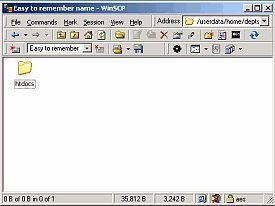
SCP VS FTP
SCP has several advantages and disadvantages when compared to FTP. For example, SCP is a non-interactive command-line tool while FTP is a highly interactive user interface. SCP encrypts files and verifies user authentication while FTP has no security features whatsoever and freely transmits the user's username, password, and server address over an unsecured protocol. SCP is often used to transfer batch files in scripts while FTP is mostly used by novice users who simply wish to upload and download files to and from their own server. While SCP and FTP each have their own benefits, a separate protocol known as FTPS provides the benefits of each of these protocols as it is easy to use and also encrypts files while they are being transferred between the host computer and the server.
The SCP Program
While SCP generally refers to the protocol being used in an SCP client, "SCP Program" refers to the actual command line that offers this service. The SCP Program can be used on both the client-side as well as the server-side for transferring files in either direction. The SCP Program is a simple tool and does not provide a user interface. Because of this, the SCP Program is recommended for only advanced users. Novice users can still take advantage of the SCP protocol in a much friendlier environment, however, by using the WinSCP software.
WinSCP
WinSCP is a free, open source graphical user interface for the FTPS, FTP, and SCP protocols. As WinSCP was specifically designed for the Windows Operating System, it is able to integrate itself with Windows in order to allow the user to simply drag and drop files into the user interface. Once the user does this, the files are uploaded to the server of the user's choice and sent over a secure connection to provide maximum encryption and data authentication. WinSCP is available in multiple languages and can be found at http://winscp.net/eng/docs/introduction .
Follow Us!